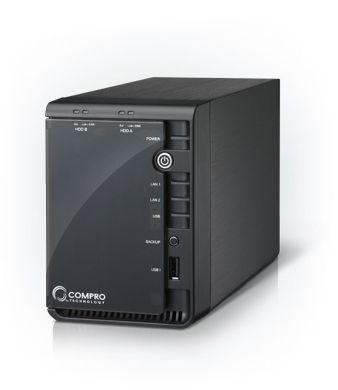
RS-2208
8 Channel Network Video Recorder
Description
RS-2208 and RS-2212 are both a dual-bay Network Video Recorder expressly designed for surveillance applications in small and mid-sized businesses. Both are designed from the ground up with ease of use in mind, and both are embedded with robust Linux system that is reliable and safe from virus and hacker attacks. RS-2208 and RS-2212 are both capable of recording high-quality H.264 video 24/7 and offer advanced data backup feature and friendly browser interface, and support the complete range of Compro IP cameras as well as ONVIF-compliant network cameras.
- Embedded Linux operating system for superior reliability
- Record H.264 megapixel video from up to 8 (RS-2208) IP cameras or 12 (RS-2212) IP cameras simultaneously
- Support dual SATA 3.0Gbs 3.5" HDD
- Support RAID-0 and RAID-1
- Remotely record, play back and search video recordings
- Remotely view and record video, and search and play back recordings
- One-touch backup to USB storage device
- Full PTZ control
- Intelligent iWizard for easy and effortless setup
High-Quality Megapixel Recording
Record high-quality video streamed from your network cameras in megapixel resolution. The megapixel resolution allows for greater detail and better identification of suspicious people. The NVR also takes advantages of H.264 compression technology, allowing you to record longer period of time compared to other compression methods.
One Touch Backup
A one-touch backup button and a USB port on the front panel enable fast and easy data backup to external USB storage devices. Support for RAID-0 and RAID-1 also helps deliver better drive performance and adds an additional layer of data security to your surveillance system.
Easy Installation with iWizard
The setup process takes just a few steps using the intelligent Compro iWizard. iWizard makes the setup process fast and easy even for novice users. Simply install the hard drive, connect the cables, run the iWizard utility, and your NVR will be up and running in next to no time.
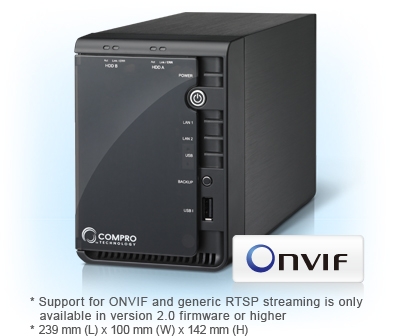
ONVIF Support
In addition to supporting the full line of Compro's network cameras, the NVR can also record video from ONVIF-compliant network cameras. The support for ONVIF standard offers greater flexibility in building your own surveillance system.
(Compro Technology does not guarantee full functionality or compatibility across ONVIF cameras; individual experience may vary based on the camera model and firmware used.)
Generic RTSP Streaming Support
There are a myriad of camera models on the market and compatibility across different manufacturers is not absolutely guaranteed. Compro NVR can receive and record standard-compliant RTSP stream from your generic RTSP camera, ensuring highest compatibility with your existing surveillance system.
Compact Size
Measured only 23 centimeters long and 10 centimeters wide, and standing slightly taller than a soda can, the RS-2208 and RS2212 can nicely fit anywhere in a home, shop or office.
Energy Efficient
This standalone NVR system consumes less than 30 watts in operation, as opposed to the 300 watts power consumption of its PC counterparts. The advanced power management feature lets you minimize the power consumption by scheduling the NVR to power up or shut down or putting the hard drive into hibernation at specified times.
SMS & Email Notification
The event notification feature allows the sending of Email or SMS alert message once your Compro network cameras detect unusual events. The SMS notification service does not impose any monthly subscription fees, and the Email notification service supports popular webmail platforms.
Friendly Browser Interface
You can view the live video and manage your NVR from anywhere and at anytime on your web browser. The NVR's browser interface, WebVUer, offers the capability to remotely search, play back, and export video recordings. The browser interface is so easy to use that there is virtually no learning time required.
PTZ Control
You can adjust your PTZ camera directly on the NVR's browser interface. Use the 8 directional control buttons to pan and tilt and use the home button to return to the preset position. For fixed cameras, you can use the same buttons to control the digital PTZ function provided by the NVR's browser interface.
One-Click Camera Setup
The NVR's iStart feature lets you set up camera connections with a click of a button. With iStart, you don't have to configure connections between your NVR and your Compro network cameras one by one. Just click the iStart button and then all the available Compro network cameras will be automatically connected to your NVR.
Free Compro DDNS Service
he NVR provides a free Compro DDNS service for remote surveillance over the Internet. Compro DDNS service enables you to create an easy-to-remember domain name that links to your NVR's current public IP address, which means you can forget about the unfriendly IP address and log in to your NVR with a unique domain name of your own.
Graphical Menu
Beautifully crafted icons in the setup menu allow users to get to the wanted functions with ease. Users can also input keywords to search available functions.
Specifications:
| SYSTEM |
Operating System |
Embedded Linux, safe from crashes and virus attacks |
| CONNECTORS |
LAN Port |
2 x Gigabit RJ-45 Ethernet port |
| USB |
USB 2.0 x 2 (front x 1, rear x 1) |
| CAMERA |
Camera |
IP55, IP60, IP70, IP540, IP540P, IP570, IP570P, NC120, NC120R, NC150, NC420, NC450, NC740 (video server) |
| Camera Administration |
Individually adjust video settings per camera |
| VIDEO |
Channel |
8/12 |
| Compression Format |
M-JPEG, MPEG4, H.264 (depends on the IP cameras) |
| Resolution |
160x120, 320x240, 640x480, 800x600, 1280x720, 1280x1024 |
| Bit Rate |
64Kbps, 128Kbps, 256Kbps, 512Kbps, 1Mbps, 1.5Mbps, 3Mbps |
| Frame Rate |
5, 7.5, 10, 15, 20, 25, 30, 60 |
| Video Setting (per Channel) |
Brightness, Contrast, Hues, Saturation, Visibility, Sharpness |
| AUDIO |
Compression |
PCM G.711 |
| 2-Way Audio |
Yes |
| Recording |
Recording Connection |
RS-2208: 8 channels, H.264/MPEG-4/MJPEG |
| RS-2212: 12 channels, H.264/MPEG-4/MJPEG |
| Recording Mode |
Continuous, motion-triggered recording, tamperingtriggered recording, scheduled recording (daily, weekly, specific day), audio-triggered recording, IOtriggered recording, manual recording |
| Pre- / Post-Event Recording |
Yes, pre-recording: up to 5 sec; post-recording: up to 300 sec |
| Recording Bitrate |
Per camera specifications, up to 60 fps per channel |
| Compression Format |
M-JPEG, MPEG4, H.264 (depending on camera) |
| Disk Usage Limitation |
Max capacity, specified size, percentage |
| File Management |
Loop overwrite, keep data by day, never erase |
| PLAYBACK |
Playback Control |
Play, pause, next frame, previous frame, beginning, end, playback speed adjustment, multiple playback speed |
| Advanced Playback Feature |
Snapshot, digital zoom, file download |
| Video Search |
Search video by date/time/channel/event |
| STORAGE |
Local Storage |
2 x 3.5" SATA I/II HDD |
| HDD Capacity |
Up to 3.0 TB |
| Disk Mode |
Single, RAID 0, RAID 1, JBOD/ linear |
| Remote Storage Mode |
Share folders on Windows OS, NAS, FTP server |
| Services |
FTP, SMB/CIFS |
| EVENT HANDLING |
Event Type |
MotionTamperingScheduleManualAudioIO |
| Event Handling |
Recording, Instant e-mail, SMS alert, CMS notification |
| PTZ CONTROL |
Direction Control |
Home, 8 x directions |
| Zoom |
According to supported network camera |
| ePTZ |
1~10x digital zoom, center mode |
| Advanced PTZ Feature |
Preset position, patrol group, speed control, focus control |
| NETWORK |
Protocols |
DDNS (iDDNS) / PPPoE / DHCP / HTTP / NTP / DNS / FTP / SMTP / ARP / ICMP / IPV4 / TCP/IP / UDP / UPnPS |
| Dual Gigabit LAN |
Yes |
| Multi-IP setting |
Yes |
| SECURITY |
Event Logs |
Detailed record of all events |
| User Management |
Yes |
| Authentication |
ID, password |
| Account Administration |
Configurable user privileges |
| Group Management |
Multi-level and multi-feature individually configurable |
| BACKUP |
One Touch Backup |
Yes |
| USB Backup |
Yes |
| GENERAL |
Setup Utility |
iWizard |
| Languages |
English, Traditional Chinese, Simplified Chinese |
| Viewing System Requirement |
OS: Windows XP/ Vista/ 7 |
| Browser: Internet Explorer 8.0 or later |
| Certification |
CE, FCC |
| Dimensions |
239 mm (L) x 100 mm (W) x 142 mm (H) |
| PHYSICAL |
Gross Weight |
2.84kgs |
| Operation Environment |
10~40C |
| POWER |
Power Supply |
AC100~240V 50/60Hz in, DC 12V output |
| Power Consumption |
6W (max) (HardDisk not incl.) |
| * |
Support for ONVIF and generic RTSP streaming is only available in version 2.0 firmware or higher |
| * |
Compro Technology does not guarantee full functionality or compatibility across ONVIF cameras; individual experience may vary based on the camera model and firmware used. |